
FLUX Kontext ControlNet: Does It Work in Hosted Editors or ComfyUI?
Hosted FLUX Kontext has no separate ControlNet input. Compare a real pose-preserving ink edit with the requirements of a local Kontext OpenPose workflow.

FLUX Kontext on flux-3image's Kontext editor accepts one reference image and a written instruction, with no separate ControlNet input for edge, depth, or pose maps. Local Kontext [dev] workflows can combine reference editing with ControlNet through community extensions, but compatibility depends on the checkpoint, adapter, and ComfyUI version. For a simple restyle that keeps a photo's broad pose, a preservation prompt may be enough.
Does hosted Kontext accept a ControlNet map?
As of October 2026, BFL's Kontext editing parameters require a prompt and an input image. The listed options include aspect ratio and seed, but no ControlNet model, conditioning map, or control-strength parameter. The fal Kontext input schema also has no separate ControlNet input.
On flux-3image, Kontext [pro] and [max] each accept one reference per edit, with output around one megapixel. Uploading a line drawing puts it in the ordinary reference-image slot. There is no second slot for a structural map or a slider for ControlNet strength.
How closely can an ink edit keep a seated pose?
This example shows how much pose a hosted Kontext edit can retain from the photo alone. We generated a fictional adult with FLUX.2 [pro] at 1K, 3:4, then edited that image once with Kontext [pro]. The exact generation prompt was:
Photorealistic studio portrait of a fictional 35-year-old woman with shoulder-length dark brown hair, seated on a simple wooden stool with both hands resting flat on her knees. She wears an olive blazer over a cream crew-neck shirt, charcoal straight-leg trousers, and closed brown shoes. Show her entire seated figure, both hands, both feet, the whole stool, and generous headroom. Front-facing camera at waist height, plain warm gray studio background, soft even lighting, natural proportions, no text, no logos.
The exact edit instruction was:
Render this as a black-and-white ink illustration. Preserve the seated pose, silhouette, hand positions, and framing.
| Generated source image | Kontext ink edit, no ControlNet |
|---|---|
| Generated full-body portrait of a fictional woman in an olive blazer seated on a wooden stool, hands on her knees | 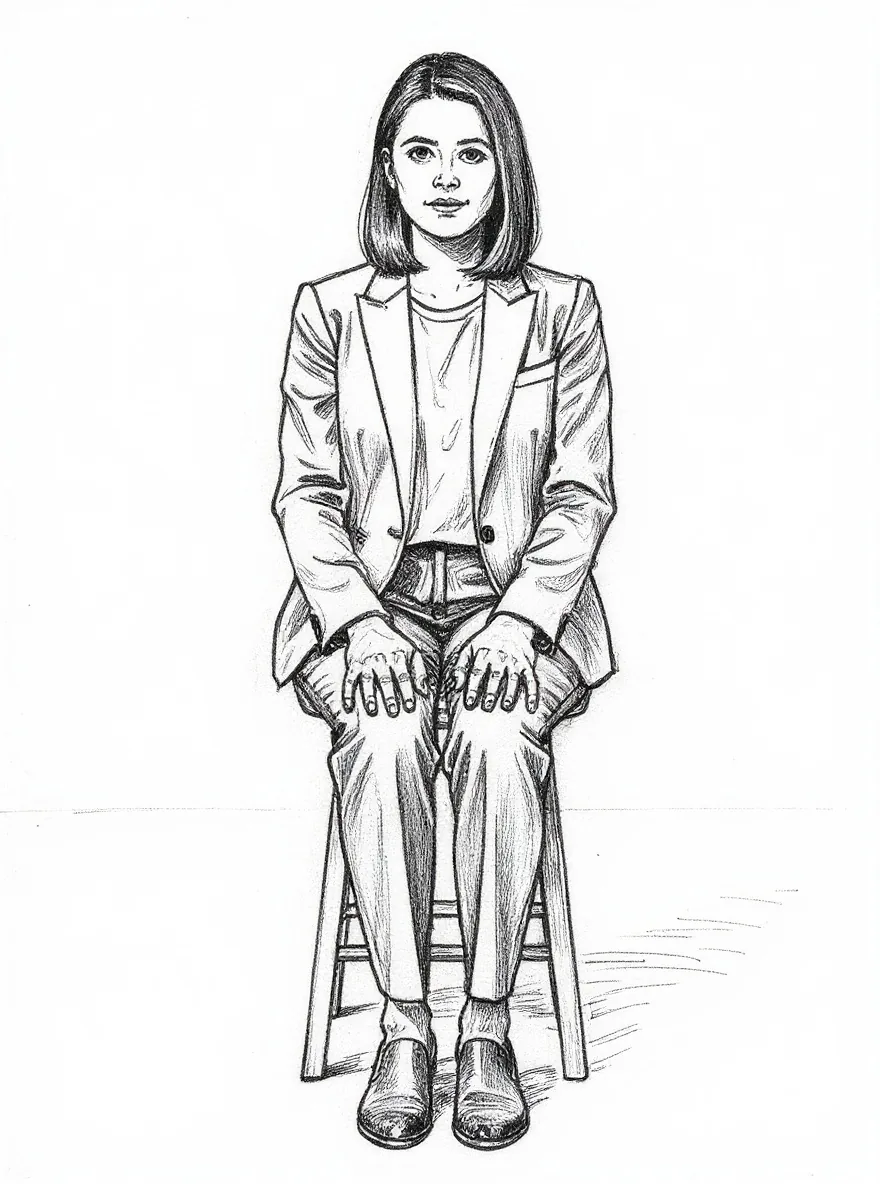 |
Left: FLUX.2 [pro], 1K, 3:4, 880 × 1168 pixels. Right: FLUX.1 Kontext [pro], automatic aspect ratio, 880 × 1184 pixels. One reference image; the instruction was sent as written.
The ink result keeps the front-facing seated pose, hands on the knees, dark bob, blazer, and both shoes fully in frame. Hatching replaces the photographic shading. The stool gains extra horizontal braces, and the trouser waistband is drawn differently. The broad pose carries over; the small geometry changes.
No edge, depth, or pose map was supplied, so this result only demonstrates reference-image editing with a preservation instruction. It cannot tell us how the same scene would behave with ControlNet. The Kontext before-and-after examples show other prompt-based edits to objects, lighting, and signs.
Can local Kontext [dev] use ControlNet in ComfyUI?
BFL's Kontext [dev] model card, checked in October 2026, lists image-plus-instruction editing and ComfyUI support. A local ControlNet setup needs additional components that support Kontext's reference-image workflow.
One concrete lead is VixDreamer's Kontext ControlNet extension. Its author describes a patch for a shape-mismatch crash involving Kontext's ReferenceLatent and ControlNet. The included VixDreams_Kontext_ControlNet_v3.json names flux1-kontext-dev-Q5_K_M.gguf and flux_union_controlnet_pro2.safetensors, with DWPreprocessor for pose extraction and ControlNetApplyAdvanced for conditioning. It includes an OpenPose pass followed by a refinement pass without ControlNet.
We inspected the workflow file but did not run it. Treat it as a community starting point: check its current requirements against your ComfyUI build and installed custom nodes before using it. A patch that addresses a crash does not establish how accurately a result follows the pose map.
Are FLUX Canny and Depth workflows the same as Kontext?
ComfyUI's Canny and Depth documentation covers separate FLUX.1 Tools models. Canny guides structure with edges; Depth uses depth information. The examples use the full FLUX.1-Canny-dev model or a FLUX.1-Depth-dev LoRA with the FLUX.1 [dev] base model. These are different checkpoints from Kontext [dev].
A workflow labeled “FLUX ControlNet” may target FLUX.1 [dev], Canny, or Depth. Read the named base checkpoint, required weights, preprocessing nodes, and conditioning connections before treating it as a Kontext workflow.
Should you use a preservation prompt or a structural map?
Use a preservation prompt for a restyle where retaining the broad pose is enough, as in the ink example. Use a compatible structural workflow when you need to supply an edge layout, depth map, or pose skeleton as a separate input. Judge the resulting image against that map before accepting it.
For hosted restyling, the FLUX style-transfer tool uses FLUX 3 Image with a written style or a style reference. It also has no separate ControlNet-map controls. If small details matter, compare the output with the original; the Kontext detail-preservation examples offer more before-and-after pairs to inspect.