
FLUX AI Image to Prompt: Write a Prompt from a Photo
Write a FLUX prompt from a photo by hand. Compare the source with two real FLUX 3 Image results, copy the prompts, and see which details changed.
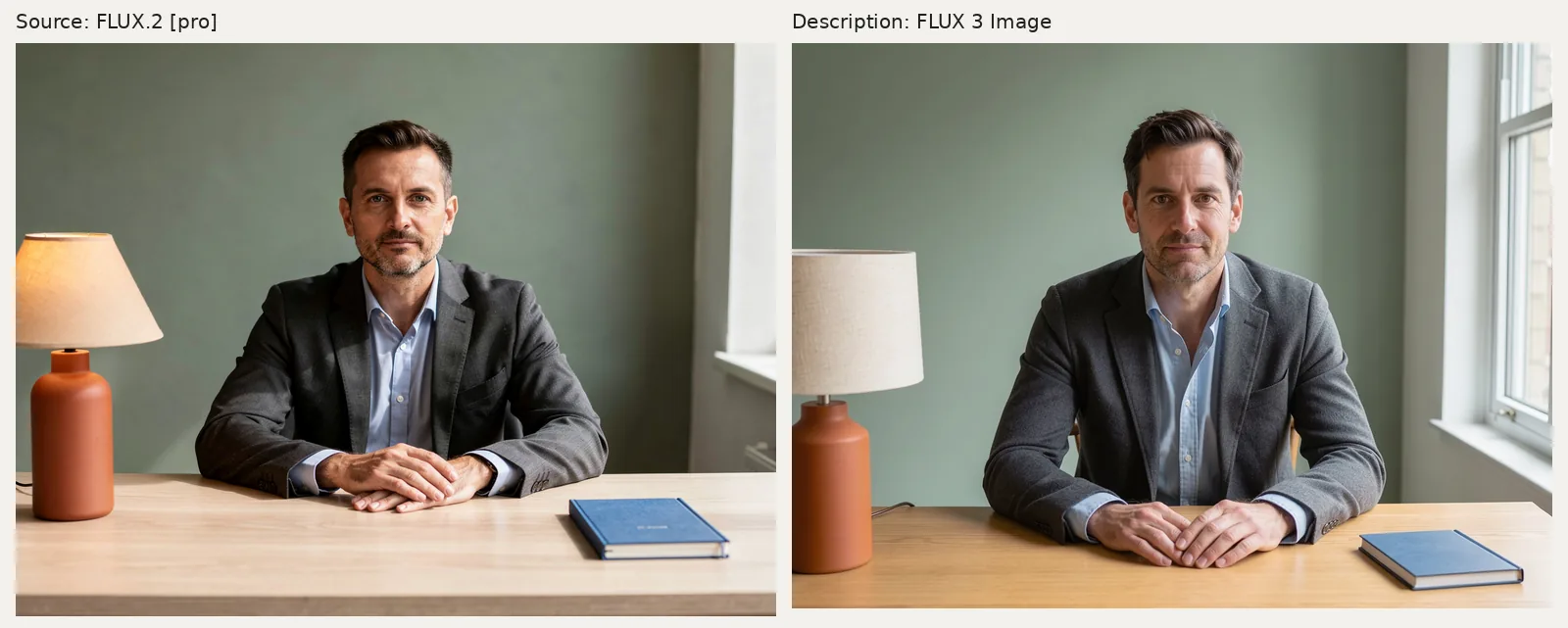
To turn an image into a FLUX AI prompt, describe its subject, composition, colors, materials, and lighting, then generate from that text. On flux-3image, you do this manually: the site generates and edits images but does not extract prompts from uploads. A description can recreate a scene's broad look; it cannot recover an unknown original prompt.
The example below starts with a generated portrait of a fictional adult. We wrote a description of the picture, generated a new image with FLUX 3 Image, then revised one framing sentence and tried again. Neither reconstruction received the source image.
Step 1: Which details make the desk portrait recognizable?
Look for the details you would miss if they disappeared. Here, those are the charcoal blazer, pale blue shirt, orange lamp, blue notebook, sage wall, and light from the right. The man faces the camera with his hands overlapping on a pale wooden desk.
We generated the source with FLUX.2 [pro]. Its complete input was:
Photorealistic environmental portrait of a fictional fully clothed 42-year-old male architect with short dark hair and light stubble, wearing a charcoal blazer over a pale blue shirt, seated at a pale oak desk. Waist-up framing with the entire head visible and generous headroom, both hands resting naturally on the desk. A terracotta table lamp sits on the left side of the image and a closed blue notebook lies on the right side of the desk. A plain sage green wall is behind him, soft daylight enters from a window on the right side of the image. Natural skin texture, quiet contemporary workspace, eye-level camera, 4:3 horizontal photograph.
For your own photo, separate observations from guesses. The clothing, object positions, and direction of light are visible. A person's profession, exact age, camera model, and lens settings usually aren't. The source prompt calls this fictional man a 42-year-old architect; you cannot establish that from the picture. Our reconstruction's “early forties” is an estimate.
Step 2: How do you turn visible details into a FLUX prompt?
Start with the subject and pose. Add the framing, then the objects, background, and light. Use left and right from the viewer's perspective so that “lamp on the left” has one clear meaning.
| Detail in the source | Wording to use in a prompt |
|---|---|
| Man looking at the camera | Looking directly at the camera, with a neutral expression |
| Dark jacket and blue shirt | Charcoal gray blazer over a pale blue open-collar shirt |
| Hands resting together | Seated at a desk with his hands loosely overlapping |
| Lamp and notebook on opposite sides | Orange table lamp at the far left; closed blue notebook near the front right corner |
| Green wall and right-side window | Plain sage green wall, with soft daylight entering from the right |
As of October 2026, Black Forest Labs' FLUX.2 prompting guide groups prompt details into subject, action, style, and context. Use those categories to organize what you see, then make the wording specific to your picture.
Here is the complete description we sent to FLUX 3 Image:
An eye-level horizontal photograph of a fictional fully clothed man in his early forties with short dark brown hair swept upward, light beard stubble, and a neutral expression, looking directly at the camera. He wears a charcoal gray blazer over a pale blue open-collar shirt and sits at a pale oak desk with his hands loosely overlapping. He is centered in a waist-up composition with space above his head. A terracotta orange cylindrical table lamp with a wide beige fabric shade stands at the far left of the desk. A closed blue hardcover notebook lies flat near the front right corner. Behind him is a plain sage green wall, with a white-framed window at the far right. Soft daylight enters from the right, brightening that side of his face and jacket. Natural skin texture, visible wood grain, quiet contemporary workspace.
Notice an omission: the source lamp shade tapers toward the top, but this prompt only calls it a “wide beige fabric shade.” That leaves its shape open. Describing an object's silhouette can matter as much as naming its color.
For more examples of subject, lighting, and framing sentences, see the FLUX.2 portrait prompt guide.
Step 3: How do you generate from the description alone?
- Sign in and select FLUX 3 Image in the model menu.
- Leave Add a photo empty. Uploading the source would switch the request to editing.
- Choose 4:3 under Size and 1K under Quality.
- Paste the full description and click Generate.
The site sends your prompt as typed, without prompt expansion. As of October 14, 2026, the live pricing page lists FLUX 3 Image at 2 credits for 1K. The free FLUX.2 [klein] option is a different model; both reconstructions here used FLUX 3 Image.
Left: FLUX.2 [pro] source, 1K, 4:3, 1168 × 880 pixels. Right: FLUX 3 Image reconstruction, 1K, 4:3, 1184 × 880 pixels. Each used its complete quoted prompt once, with no reference image. Panels are resized proportionally.
The reconstruction keeps the blazer, blue shirt, sage wall, left-side lamp, right-side notebook, and window light. The shade becomes a drum, the hand pose changes, and the man fills more of the frame; the similar face is a new generated result, not preserved identity.
Compare the output with your source before adding more adjectives. For this portrait, a more precise lamp phrase would be “a beige shade that is narrower at the top and wider at the bottom.” That wording is a suggested revision; we did not generate it here.
Step 4: How can you revise the framing sentence?
Keep the rest of the description and replace the sentence about composition. We changed “He is centered in a waist-up composition with space above his head” to a request for a wider shot and more desktop. The complete revised input was:
An eye-level horizontal photograph of a fictional fully clothed man in his early forties with short dark brown hair swept upward, light beard stubble, and a neutral expression, looking directly at the camera. He wears a charcoal gray blazer over a pale blue open-collar shirt and sits at a pale oak desk with his hands loosely overlapping. Use a wider medium shot with the man centered, generous space above his head, and the pale oak desktop forming a broad horizontal band across the lower quarter of the image beneath his overlapping hands. A terracotta orange cylindrical table lamp with a wide beige fabric shade stands at the far left of the desk. A closed blue hardcover notebook lies flat near the front right corner. Behind him is a plain sage green wall, with a white-framed window at the far right. Soft daylight enters from the right, brightening that side of his face and jacket. Natural skin texture, visible wood grain, quiet contemporary workspace.
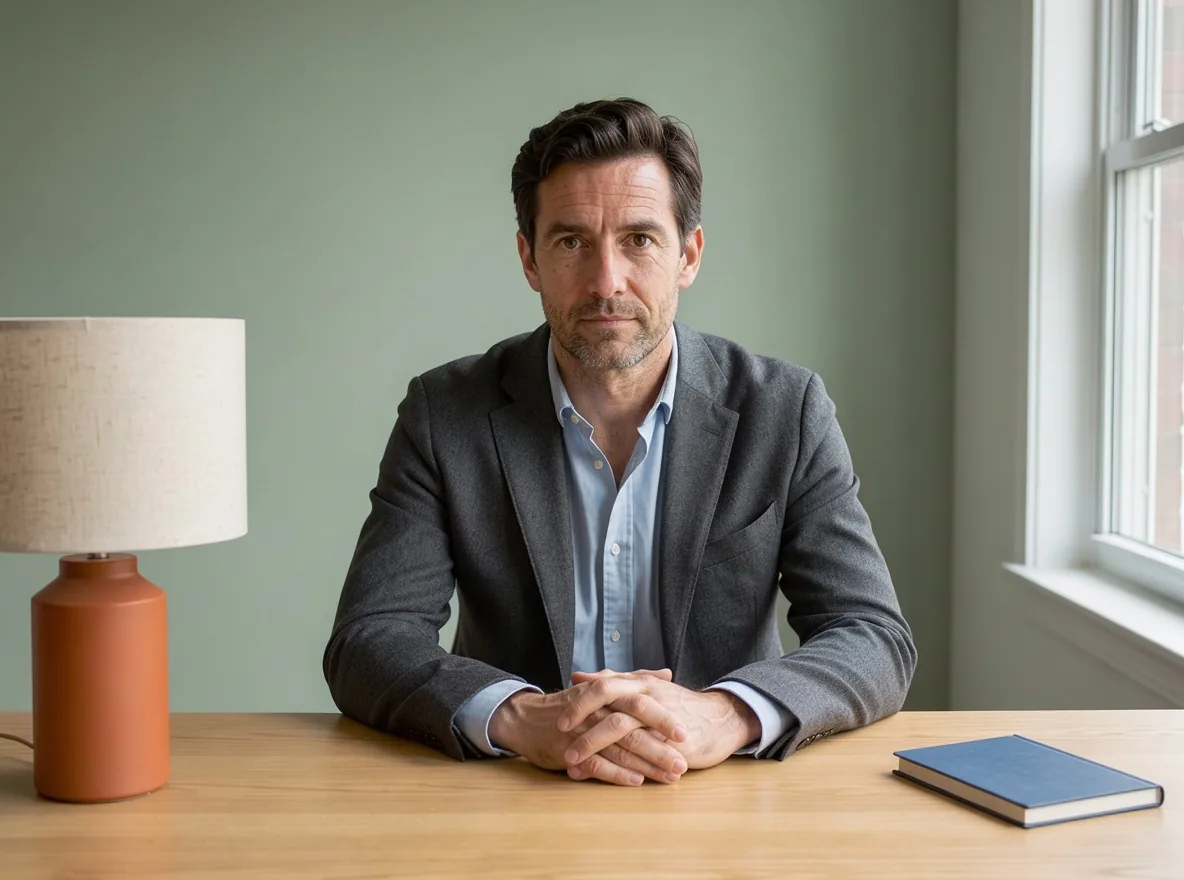
FLUX 3 Image, 1K, 4:3, 1184 × 880 pixels. One generation from the complete revised prompt above, with no reference image.
The revised output still has a tight portrait crop, and the hands are now clasped. The framing is not clearly closer to the source, despite the request for a wider shot.
Each prompt produced one image, so this pair cannot isolate the effect of the framing sentence from variation between generations. To revise your own description, choose the most important mismatch, change that passage, and compare the next result with the source again.
Step 5: When should you upload the photo for an edit?
Use a written description when you want a new picture with similar lighting, colors, or arrangement. If you need to work with the existing person or object, upload the source and give an editing instruction.
The FLUX 3 Image editor accepts a photo plus your instruction. For this portrait, you could ask: “Change the sage wall to warm cream. Keep the man, blazer, lamp, notebook, desk, framing, and lighting unchanged.” We did not run that edit here.
Writing out the whole scene gives you a reusable prompt for new images. Uploading the picture gives the editor the visual reference that a description leaves out.