
FLUX 2 Technical Report: VAE Findings and Model Docs
Read BFL’s FLUX.2 autoencoder findings, choose the right model docs and inference code, and compare the research with a hosted Pro vase edit.

For the FLUX 2 technical report, start with Black Forest Labs’ FLUX.2 latent-space research. It explains the autoencoder experiments; BFL’s launch overview, model card, and inference code answer separate questions about architecture and deployment. For a browser example of generation and editing, use the FLUX.2 Pro tool on flux-3image, an independent app that runs BFL models.
As of October 2026, these sources give you three kinds of evidence: research measurements, instructions for running downloadable weights, and hosted image outputs. The distinction matters when you want to understand what a reported result actually establishes.
Where should you start reading about FLUX.2?
BFL’s FLUX.2 launch article, dated November 25, 2025, outlines a latent flow matching architecture that handles generation and editing. It couples a Mistral-3 24B vision-language model with a rectified flow transformer and links to the latent-space study. Start there for the architectural overview, then choose the source that answers your next question.
| Source | Question it answers | Evidence to inspect | What reproduction requires |
|---|---|---|---|
| BFL launch overview | How is the family structured? | Architecture summary and example images | A named model and matching request settings for an image example |
| Latent-space research | How do autoencoder choices affect results? | Reconstruction and generation experiments | Matching data, encoders, training settings, and evaluation |
| FLUX.2 dev model card | What is this downloadable checkpoint? | Checkpoint description, usage examples, and license links | The named weights and a compatible environment |
| BFL inference repository | How do I run open-weight models? | Source code, dependencies, and inference instructions | Hardware, weights, dependencies, and runtime settings |
| BFL API documentation | How do I call a hosted model? | Endpoint descriptions and request parameters | Endpoint access and supported settings |
The FLUX.2 API overview is useful for hosted integration. It is a different starting point from the dev model card, which describes weights you can download. Check which model and interface a number belongs to before applying it to your own setup.
Keep the model suffix in your notes and citations. A parameter count for FLUX.2 [dev], a memory estimate for quantized dev, and a Pro editing result describe different things. Calling all three simply “FLUX.2” makes the comparison harder to follow.
What does the FLUX.2 autoencoder study show?
A variational autoencoder, or VAE, encodes an image into a latent representation and decodes it back. BFL studies the trade-off between reconstruction fidelity, compression, and how easily a generator learns that representation. Its FLUX.2 VAE combines increased latent dimensionality with semantic regularization.
The study trains flow matching models on 256 × 256 ImageNet images using frozen encoders and a DiT-XL backbone. Generation FID uses 50,000 samples with 50 Euler sampling steps. These are research evaluation settings, not recommended settings for a hosted Pro request.
In Table 1’s reconstruction results, FLUX.2 records LPIPS of 0.2668 versus FLUX.1’s 0.3380, where lower is better. The table also reports SSIM, PSNR, and reconstruction FID. BFL finds improved reconstruction and learnability for FLUX.2 within its experimental setup.
Reconstruction measures how faithfully an encoded image returns after decoding. Generation FID evaluates generated samples separately. Neither measurement tells you whether an edit will preserve every vase highlight or match a requested paint color. Inspect the actual output for those questions.
What can you reproduce with the dev weights and code?
The FLUX.2 dev model card describes a 32-billion-parameter rectified flow transformer for generating, editing, and combining images. It supplies a Diffusers example and links to the noncommercial model license. Those checkpoint details apply to dev; they do not establish the parameter count or availability of Pro weights.
BFL’s FLUX.2 inference repository contains code for its open-weight models. The dev Diffusers instructions show why a memory estimate needs its configuration attached: one example uses a 4-bit transformer and a remote text encoder, while another uses a quantized text encoder with CPU offload. A remote encoder also means part of the request runs outside your machine.
For a reproducible inference run, save the checkpoint revision, software versions, precision, prompt, reference files, output dimensions, seed, steps, and guidance settings where available. Record quantization and offload choices too. This makes it possible to distinguish a prompt change from a change in the model or runtime.
An inference run reproduces the process of producing an image. Reproducing the latent-space experiments requires the study’s training and evaluation setup as well. Downloading dev weights and generating a vase would not reproduce the published reconstruction measurements.
For more on downloadable weights and hosted access, see FLUX.2 licenses and local use. Check the license attached to the checkpoint separately from the code license before choosing a deployment.
How does a hosted Pro edit compare with the research evidence?
This existing FLUX.2 [pro] pair from the product page shows generation followed by editing. The page describes the requests, but the exact submitted prompts and original generation settings are unavailable. Both saved images measure 1024 × 768 pixels, or 4:3.
The source description specifies a ceramic vase with a #0B6E4F-to-#F2C14E gradient, white tulips, a walnut sideboard, and natural light. The edit description replaces the tulips with dried pampas grass and changes the vase colors to #3A2E5C and #E07A5F, asking to keep the sideboard, wall, and light.
Existing FLUX.2 [pro] generation example, 1024 × 768 pixels, 4:3; used as the edit reference. Original prompt and generation settings unavailable.

Existing FLUX.2 [pro] edit example, 1024 × 768 pixels, 4:3. The product page identifies the preceding vase image as its reference.
The tulips become pampas grass, and the vase changes from green and yellow to purple and reddish coral. Its rounded shoulders and narrow neck remain recognizable; the sideboard edge and wall artwork stay in similar positions. The wall shadow and vase highlights change, so the request to keep the light does not yield identical lighting details.
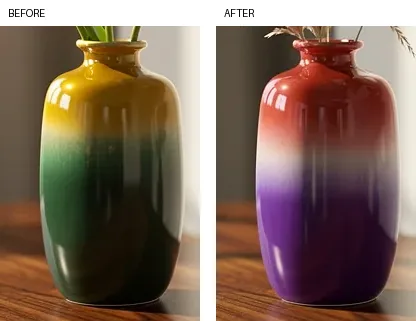
Two 200 × 295-pixel crops at matching coordinates, before on the left and after on the right; shown without enlargement.
The crops show the color change and retained overall shape. Exact hex-color accuracy was not measured. This pair illustrates the complete Pro editing model; it cannot isolate the autoencoder’s contribution or reproduce the study’s scores.
To inspect a related edit yourself, select Pro in the FLUX.2 model tools, upload a source image, and specify one change. Try: “Change the vase to red. Keep its shape, the flowers, the sideboard, and the lighting unchanged.” This is a suggested prompt for a new test. Compare the full scene as well as the vase, and use the FLUX.2 prompt guide for examples of subject and framing instructions.
As of October 2026, Pro on flux-3image offers 1K or 2K output and up to eight references. The pricing page lists 3 credits for 1K generation plus 3 per reference, so a one-reference 1K edit costs 6 credits. That is the current price for trying an edit, not a record of what the archived pair cost.